 Hemory Team
On this page
You’re considering an AI note taker because meetings leave you with more information than you can comfortably write down. Most product pages promise transcripts, summaries, and action items. The harder question is which tool will let you stay involved in the conversation and still have what you need afterward.
Base your choice on the meetings you actually have and the work that follows them. A useful trial should show whether the tool captures those conversations, preserves important details, and helps you use them again. This checklist explains what to compare and how to judge the results before you subscribe.
TL;DR
- Match the recording method to your meetings: video calls, in-person discussions, or a mixture of both.
- Check that notes preserve decisions, owners, and conditions as well as presenting a clear summary.
- Try finding information again and using it in a real follow-up task.
- Compare the work left for you, along with privacy controls, plan limits, and price.
Start with the work you want to make easier
Before comparing feature lists, name the job you need help with. “Take better notes” can mean several different things.
| Your main need | What to prioritize |
|---|---|
| Stay focused during frequent meetings | Easy recording and automatic organization that require little attention during the discussion |
| Follow through on client commitments | Accurate scope, owners, dates, and dependencies |
| Write proposals or research findings | Detailed context, source access, and retrieval across relevant conversations |
| Keep track of a changing project | A way to distinguish earlier plans from later decisions |
| Use meeting information in an AI assistant | Access from the AI tool you use, with enough detail for the task |
Choose two or three requirements that would make the tool worth keeping. A consultant who needs to recall a client’s reasoning will evaluate a product differently from someone who only wants a short recap after a weekly check-in.
This also helps you avoid paying for a large feature set that adds little to your own work.
Seven things to compare before choosing an AI note taker
1. Does the recording method fit your conversations?
Start with where your conversations happen. A tool that works well in scheduled video calls may be inconvenient during a workshop or an impromptu discussion.
Common approaches include a bot joining a video call, an app capturing audio on a computer, recording on a phone or wearable, and uploading an existing recording. Availability varies by product. Check the route you would actually use, including the device and operating system.
For in-person discussions, try your usual seating arrangement. Can the tool capture someone speaking from the other side of the table? For video calls, check whether it captures both sides of the conversation with your normal headset setup. If calls often interrupt your recording, check how the app handles that interruption.
The practical question is how much attention recording demands. Repeatedly adjusting settings or watching for gaps can undermine the reason you wanted help taking notes.
2. Does it preserve the details that change the meaning?
A transcript and a summary solve different problems. The transcript preserves what was said; the summary selects and organizes the parts it considers important. A readable summary can still omit a condition or attach a commitment to the wrong person.
Focus on details that affect your next action:
- Names, product terms, quantities, and dates.
- Who proposed an idea and who agreed to it.
- Corrections made later in the discussion.
- Conditions attached to a commitment.
- Questions that remain unresolved.
For example, “We can start once the quote is approved” should retain the approval condition. Recording only “Start the work” changes the commitment.
During a trial, check a few consequential details against the conversation. A polished paragraph is less useful if you must reconstruct the agreement before acting on it.
3. Does the output match what you need after the meeting?
Look at what the tool produces by default. Does it separate decisions, action items, and open questions? Is the result easy to scan? Can you get the level of detail your work requires?
A useful action item identifies the action, its owner, and any agreed date or dependency. A useful decision record also preserves the reason when that reason affects later work. Our decision log template shows how those records differ from a task list.
Consider how much editing remains. If you routinely rewrite the entire summary, the output may be poorly matched to your role even when the transcription is sound. If the default notes already provide what you need, extra templates and customization may add little value.
4. Can you find useful information after the meeting is over?
Opening yesterday’s notes is one task. Finding a reason mentioned across several weeks of customer discussions is another.
Try retrieval at the level your work needs:
| Retrieval task | What to look for |
|---|---|
| Find a specific statement | Search by a phrase, topic, person, or approximate date |
| Understand a commitment | Recover the surrounding explanation and conditions |
| Follow a change | Find both the earlier plan and the later update |
| Investigate a recurring concern | Bring together relevant discussions without opening every meeting yourself |
A saved summary gives you the information selected at the time. Later questions may require details outside that summary. Check whether the tool lets you reach the underlying discussion and whether the result gives you enough context to use it.
This is especially valuable when you remember that something was discussed but cannot remember which meeting it was in.
5. Can the information reach your next task?
A tool can produce good notes and still leave you copying them between applications. Think about the next step: an email, a proposal, a project update, or work with an AI assistant.
Different connections serve different needs. An export gives you a file. A task integration moves action items into another system. An AI connection can let an assistant retrieve relevant discussion context while handling your request.
Check the connection that matters to you. Can it use the source material you need, or only a short summary? Does it work with your chosen application? How much manual selection and reformatting remains?
For a simple trial, prepare one meeting follow-up email using the notes. Notice whether the tool helps you recover accurate commitments and how much effort you still spend sorting through the material.
6. Do the recording and sharing controls fit your work?
Review how you start and stop recording, who can access the resulting notes, how sharing works, and what deletion removes. Check the vendor’s current documentation for how audio and text are handled, especially if you work with client information.
Separate your needs as an individual from requirements for a shared team workspace. A personal record, a shared meeting archive, and an organization-wide search system involve different access expectations.
Use a trial conversation that everyone is comfortable recording and that your workplace permits. You can then evaluate the experience without introducing material the service is not approved to handle.
7. Is the total cost reasonable for your usage?
Compare the plan that supports your workflow, including recording limits, meeting length, history access, search, and any integrations you need. A free tier can be useful for trying the interface without covering your normal workload.
Include your own time in the decision. Setup, corrections, finding information, and moving it into another tool all contribute to the cost of using the product.
A tool that saves transcription time but adds substantial checking and reformatting may deliver less value than its summary suggests. Judge it against your current way of working.
How to test an AI note taker during your trial
You do not need to design a laboratory test. Use a few representative conversations and complete a piece of work you would have needed to do anyway.
- Choose a familiar meeting. Use your usual device, vocabulary, and meeting format. Identify a few important details you will check afterward.
- Review the automatic output. Look for decisions, owners, dates, conditions, and unresolved questions. Note what you need to correct.
- Come back with a real question. Ask about a commitment, a constraint, or a decision’s rationale. Check how easily you can reach the relevant discussion.
- Use the result. Prepare a follow-up, proposal section, or project update. This reveals whether the notes actually reduce your work.
- Repeat where it matters. If your work includes both interviews and group discussions, try both. Investigate a recurring problem under comparable conditions.
Use a short comparison sheet rather than collecting scores for every available feature:
| Requirement | What happened in your trial? | Work left for you | Decision |
|---|---|---|---|
| Captures my usual meetings | Keep / Retest / Rule out | ||
| Preserves important commitments | Keep / Retest / Rule out | ||
| Finds details when I return later | Keep / Retest / Rule out | ||
| Helps complete my next task | Keep / Retest / Rule out | ||
| Fits my access needs and budget | Keep / Retest / Rule out |
Keep a tool when it consistently meets your important needs with manageable effort. Retest when a problem may depend on setup or you have not tried an essential use case. Rule it out for that workflow when a required capability is missing or consequential errors persist.
A minor formatting issue and a repeatedly incorrect owner deserve different weight. Base the decision on the work at risk, not the number of boxes checked.
When conversation memory should influence your choice
If you mainly need a recap, summary quality and ease of use may matter most. If your work repeatedly draws on earlier conversations, give retrieval and reuse more weight.
Consider preparing a proposal after several customer discussions. The latest meeting may cover scope, while an earlier conversation explains a constraint that makes one approach unsuitable. Having each meeting summarized still leaves the work of connecting those details.
Hemory is built around turning real-world conversations into searchable memory. It records the discussions you choose to capture and automatically organizes them, so you can focus on participating and return later with a specific question. Its built-in Q&A lets you ask questions about those conversations. Through the Model Context Protocol (MCP), which connects AI tools to external data, compatible agents can also retrieve that context for your work.
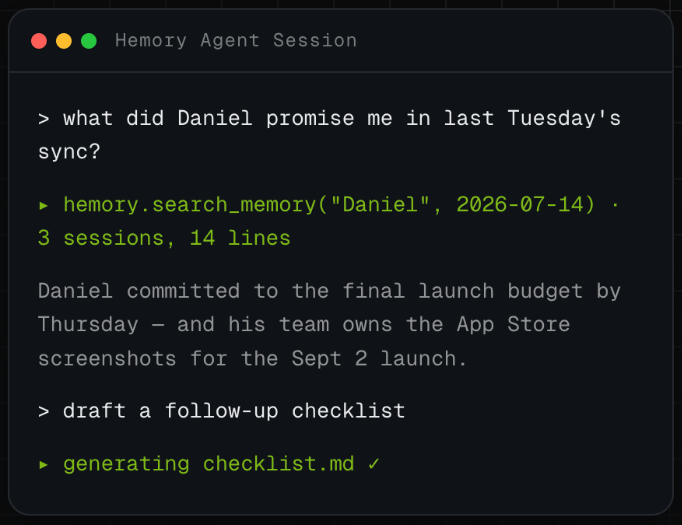
For the proposal, that means asking what the customer said about a particular constraint, finding the relevant discussion, and using it while shaping the recommendation. You can begin in Hemory’s Q&A; an agent connection becomes useful when you want that context available inside your AI workflow.
That is the reason to include Hemory in your shortlist when you regularly use past conversations in your work. In your trial, see whether it makes the path from discussion to useful work easier.
Make the choice around your next conversation
Choose the tool that fits where you talk, preserves what matters, and makes the next task easier. A longer feature list is useful only when those features improve your work.
If you want to keep customer discussions, product reviews, or brainstorming sessions available for later use, try Hemory with your next suitable conversation. Start recording with participants’ agreement, stay involved in the discussion, and return when you have a real question to answer.
Frequently asked questions
What is the most important feature in an AI note taker?
It depends on the job you need it to do. Accurately capturing commitments matters for client follow-up; detailed retrieval matters for research and proposals. Start with your recording needs, then prioritize the output and later use that would make the tool worth keeping.
How many meetings should I use for a trial?
Try a few that reflect your normal work. One quiet conversation can help you learn the tool, but it will not tell you how it handles a group discussion or your specialist vocabulary. Repeat any check that could change your choice.
Should I choose based on a transcription accuracy claim?
Use the claim as something to investigate. Your language, terminology, audio conditions, and speakers affect the result. Check the details that matter to your work and how much correction they require.
Do I need an AI connection if the tool already produces summaries?
Only if it helps your workflow. Summaries may be enough for a quick recap. If you regularly use an AI assistant to write or plan from meeting information, a connection can reduce the work of finding and copying the relevant context yourself.