
 Hemory Team
On this page
The meeting ends, and you open a blank email. You remember the main outcome, but was Thursday the deadline for your quote or for the client’s images? Getting those details straight can take longer than writing the message.
A follow-up email after a meeting should confirm what was agreed, who will do what next, and any reply you need. Use the templates below for the structure. When details are missing, Hemory can help you retrieve the recorded discussion and bring that context into a draft.
TL;DR
- Choose the template that matches the meeting’s outcome and audience.
- Include agreed actions, owners, dates, and any conditions that affect delivery.
- Make the requested reply easy to spot; a recap may need no reply at all.
- Use Hemory to find the agreed scope, dates, and conditions in a recorded conversation before drafting your follow-up.
Three meeting follow-up email templates
Replace the brackets and remove lines you do not need. Include only dates and commitments that were agreed; put missing details under “To confirm.”
| Your situation | Choose | Main purpose |
|---|---|---|
| Colleagues need a record of agreed work | Internal project template | Make responsibilities and next steps easy to scan |
| A client needs to confirm scope or provide input | Client template | Align deliverables, dependencies, and outstanding requests |
| A choice is still unresolved | Template for unresolved decisions | Identify the evidence or approval needed to move forward |
1. After an internal project meeting
Use this when the team has agreed on a direction and needs a concise record of the next steps. Direct language works well because colleagues already know the background.
Subject: [Project] — decisions and next steps

Hi team,

We agreed to [decision] so that [reason or intended result].

Next steps:
- [Owner]: [deliverable] by [agreed date].
- [Owner]: [deliverable], once [dependency is met].

To confirm: [open question, if any].
Working document: [link]

[Specific request for a reply, or: No reply needed unless I've missed something.]

Thanks,
[Name]
Keep internal subtasks in the working document. The email should help people recognize their responsibilities quickly.
2. After a client meeting
Use this to confirm the scope, your deliverables, and any client input needed to move forward. A short thank-you sets the tone; concrete next steps make the message useful.
Subject: [Client/project] — agreed scope and next steps

Hi [name],

Thanks for discussing [purpose] with us today. We agreed to [scope or outcome].

We'll send [agreed deliverable] by [agreed date].
Once [approval or input] is received, [owner] will [agreed next action].

Could you confirm [specific outstanding point]?
[Explain what depends on the answer, if useful.]

Best,
[Name]
Distinguish the date you will submit something from the date the client will receive a finished outcome. A proposal due Thursday does not establish a Thursday launch date.
3. After a meeting with no final decision
Use this when the discussion narrowed the options but more evidence or approval is needed. State the unresolved choice and the next agreed step.
Subject: [Project] — open decision and next review

Hi [name/team],

We reviewed [options] today. The decision on [specific issue] remains open
because we still need [information or approval].

Before the next review:
- [Owner] will [agreed action] by [agreed date].
- [Owner] will [agreed action].

We'll revisit the decision [at the agreed meeting / when the input is ready].

[Specific question or confirmation request, if needed.]

Thanks,
[Name]
If no next review was agreed, propose one explicitly: “Could we review the results on Tuesday?” That keeps a new suggestion distinct from the meeting’s outcome.
Choose a subject line and closing that fit the task
A useful subject line identifies the work and the reason for the message. Add a date when it distinguishes recurring discussions.
| Purpose | Subject line example |
|---|---|
| Recap a project meeting | Website refresh — decisions and next steps |
| Request approval | Analytics rollout — proposal ready for review |
| Resolve an open question | Training plan — facilitator to confirm |
| Summarize a recurring meeting | October 21 product sync — actions and blockers |
The closing should tell the reader whether a reply is needed:
- Approval: “Could you approve option A or send the changes you need?”
- Missing information: “Who will lead the training session?”
- Confirmation of a proposed time: “Would Tuesday at 10 a.m. work for the review?”
- Information only: “No reply needed unless I’ve missed something.”
Avoid stacking several broad requests at the end. If three answers are essential, number the questions so the recipient can respond to each one.
From a busy day of meetings to a follow-up with Hemory
Suppose Jordan, an agency project lead, is finishing a day of client meetings. While writing to Elena, the client’s marketing lead, Jordan remembers agreeing on a website redesign but is unsure which pages were included, when the client agreed to send the assets, and what needs to happen before design work starts. The notes say only “send quote.”
Jordan recorded the discussion in Hemory. The simplest place to start is its built-in Q&A: find the missing details, check the relevant discussion, and use the client template above to write the email.
In this week's website redesign discussion with Elena, which pages did we
agree to redesign? Who promised to send what, and by when? What needs to
happen before the mockups can start, and what is still undecided?
Show the relevant parts of the discussion.
The customer name, topic, and approximate time provide search clues. If several discussions match, narrow the request to the right one. You do not need to supply all the missing commitments in the question; those are the details you are looking for.
The discussion might go like this:
Elena: “Let’s redesign the homepage and pricing page. Leave checkout as it is.”
Jordan: “I’ll send a quote for those two pages by Thursday, October 22.”
Elena: “I’ll send the brand guidelines and approved product images by Friday, October 23.”
Jordan: “We’ll start the mockups once you’ve approved the quote and we’ve received the assets. We still need to confirm who will supply the new page copy.”
Those details give the email its structure:
| What was said | What belongs in the follow-up |
|---|---|
| Homepage and pricing page included; checkout unchanged | Confirm both the included work and the scope boundary |
| Jordan sends the quote on Thursday; Elena sends assets on Friday | Keep the two dates attached to the right owners |
| Mockups depend on quote approval and receipt of assets | Preserve both conditions without adding a delivery date |
| The copywriting owner is unresolved | Request a decision without adding copywriting to the agreed scope |
A draft based on those details could read:
Subject: Website redesign — scope and next steps

Hi Elena,

Thanks for today's discussion. We agreed to redesign the homepage and
pricing page, with no changes to checkout.

Next steps:
- I'll send the quote for the two pages by Thursday, October 22.
- You'll send the brand guidelines and approved product images by
  Friday, October 23.
- We'll start the mockups once the quote is approved and the assets arrive.

Could you confirm whether your team will supply the page copy, or whether
you'd like to discuss a copywriting option in the quote?

Best,
Jordan
Jordan can now check the two dates, both dependencies, and the scope before sending the message from an email application. The quote does not silently grow to include copywriting, and Friday’s asset deadline does not become a promise to deliver finished mockups. The retrieved context supplies the client-specific details needed to complete the template.
The Model Context Protocol (MCP) lets AI tools access external data. If you already use a compatible AI agent connected to Hemory through MCP, you can ask it to retrieve the discussion and prepare a draft. Hemory supplies the conversation context; the connected agent writes the email for you to review:
Find this week's website redesign discussion with Elena.
Draft a short follow-up email from me, Jordan, to Elena using the agreed scope,
next steps, dates, and outstanding questions from that conversation.

Below the draft, show the supporting conversation references and flag
anything unclear. Keep this review material out of the email itself.
Review the draft against the discussion, then send it from your email application. You can start with the built-in Q&A and a template without setting up an external agent.
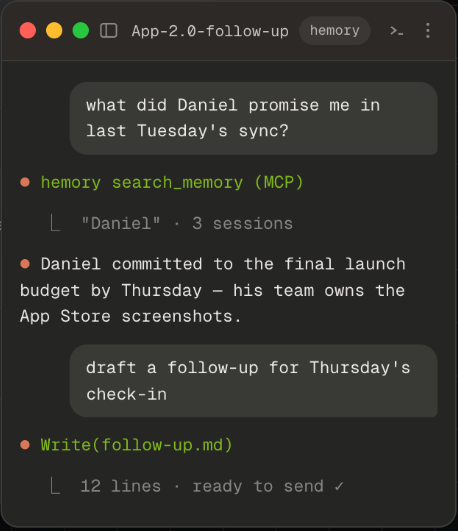
For someone moving between customer discussions, this reduces the need to piece together each meeting before writing. If Elena later asks why checkout was left unchanged, Jordan can return to the same discussion for any supporting explanation. The email captures the immediate next steps; the saved conversation remains useful for later questions.
Check four things before sending
Scope: Does the message match what was agreed? Watch for a tentative suggestion becoming “we will deliver.”
Timing: Are the dates clear, and are approvals or other dependencies still visible? Resolve ambiguous phrases such as “next Friday” before replacing them with a date.
Audience: Remove internal deliberations or source links the recipient should not receive. Keep the email focused on their part of the work.
Next action: Can the recipient tell what to do after reading? If nothing requires a response, say so.
After sending, track your own commitments in your task list. Hemory also automatically organizes meeting action items, which gives you a starting point for reviewing what you need to follow through on.
Try it with one follow-up you actually need to send
For your next suitable client conversation, let the participants know and start recording in Hemory. When you sit down to write, ask what was agreed and what remains open. Use the answer and relevant discussion to complete the client template, or have your connected agent draft it. Judge the result by whether it makes the message easier to prepare and gives you enough context to verify the commitments in your email.
Frequently asked questions
When should I send a follow-up email after a meeting?
For a routine work meeting, aim for later the same day or the next working day, while the discussion is fresh. Send it before someone needs to act, and take time to clarify any disputed commitment first.
How long should the email be?
Keep it short enough for the recipient to identify the outcome and next steps in one read. A simple meeting may need two paragraphs; a discussion with several owners benefits from a short action list and a link to fuller notes.
How do I follow up again if there is no reply?
Reply in the same thread and bring back the specific question. For example: “Hi Elena, following up on the page copy: will your team supply it, or would you like a copywriting option in the quote? That will help me prepare an accurate estimate.” Add a real deadline if one exists.
Should I attach the full meeting notes?
Include a link when the recipients need the detail and can access it. Keep the outcome and requested action in the email so they can respond without opening another document.